AI Test Automation Platform
AI Test Automation Platform
- Project:
- B2B SaaS · AI Test Automation Platform
AI Product Design | Generative AI | Large Language Models | Human-AI Interaction | Enterprise UX | UX Strategy | Interaction Design | User Research | Prototyping
This project explores the design of an AI-powered test automation platform that converts requirements into structured test assets. It demonstrates how thoughtful UX can simplify complex automation workflows and support efficient, scalable product development.

Turning manual requirements into runnable, traceable tests
"30 minutes instead of three weeks to generate test assets."
Source: [Q1]
Eggplant Generator is positioned to reduce the manual gap between written requirements and runnable, traceable tests using enterprise-grade AI.
- Product: Browser-based AI that converts requirement documents into test assets while preserving traceability; supports secure customer-controlled deployments.
- Category: Enterprise AI test design and test‑authoring integrated with Eggplant Software.
- Job‑to‑be‑done: Turn requirement exports into AI‑generated Gherkin scenarios and manual test cases in minutes.
- Context: Built for enterprise and regulated environments where auditability, traceability, and secure deployment are required.
Manual test asset creation vs Generator-assisted creation. Author-created data visualisation using Claude AI based on publicly available Keysight quote comparing 30 minutes with about three weeks of manual scripting for 48 requirements; percentage reduction shown is an author calculation based on a 15-working-day assumption, simplified for explanatory purposes. Source: [AI1].
Overview
Eggplant is an enterprise generative AI testing suite for creating, running, and monitoring software tests end-to-end. This case study focuses on an AI-driven product within that suite, which is designed to automate how manually written requirements are transformed into test assets.
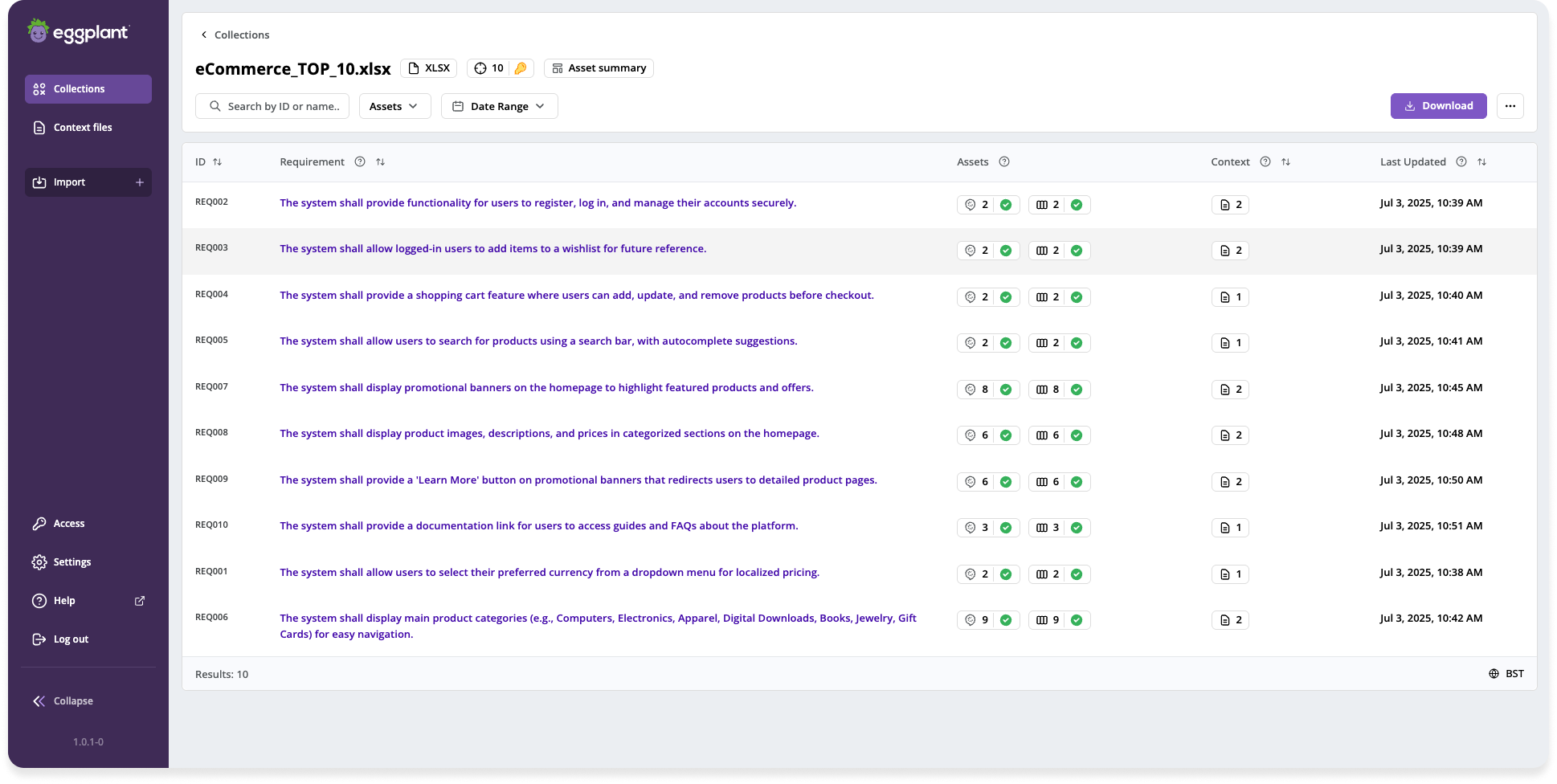
The Collections page. Image from publicly accessible Keysight website. Source: [V1].
The work is focused on delivering a practical first release for enterprise and regulated environments, where security, offline operation, and data control are important and shape how users review AI-generated outputs and maintain traceability.
The problem
Enterprise QA teams rely on natural-language requirements, but converting them into runnable tests is often manual and time-consuming.
In regulated or offline environments, requirements may live in spreadsheets or external tools that don't integrate with the test run systems. This creates gaps between requirements, test assets, and results, which leads to the reduction in coverage visibility and increases the effort needed to trace failures.
The outcome can be slower release cycles, more effort during sign-off, and higher compliance and audit risk when traceability is limited.
Import requirements – Step 2: select which columns to import.
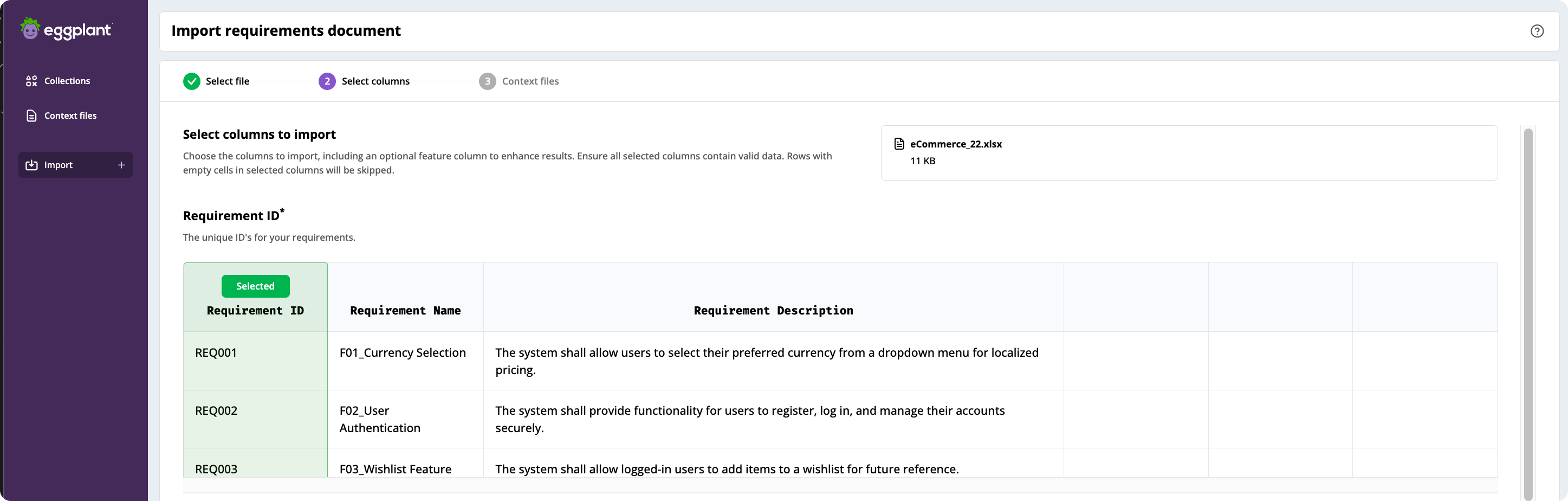
Import requirements – Step 2: select which columns to import. Image from publicly accessible Keysight website. Source: [V2].
The solution
Eggplant Generator enables teams to upload requirements (such as Excel or CSV files), optionally add context files, and generate structured test assets linked back to their source requirements.
In a secure, browser-based workflow positioned for customer-controlled deployment (including on-premises and offline setups), teams can review and download outputs to keep requirements and tests aligned with less manual scripting.
Why it matters
Manual requirement-to-test workflows slow delivery and make coverage harder to assess.
Keysight positions Eggplant Generator as a tool that creates test assets from requirements in minutes, including Gherkin scenarios and manual test cases. Collections help users trace requirements to the tests generated from them, and the product supports secure deployment in offline, on-premises, and air-gapped environments.
Generator converts requirements into test assets while preserving traceability between the source requirements and generated outputs.
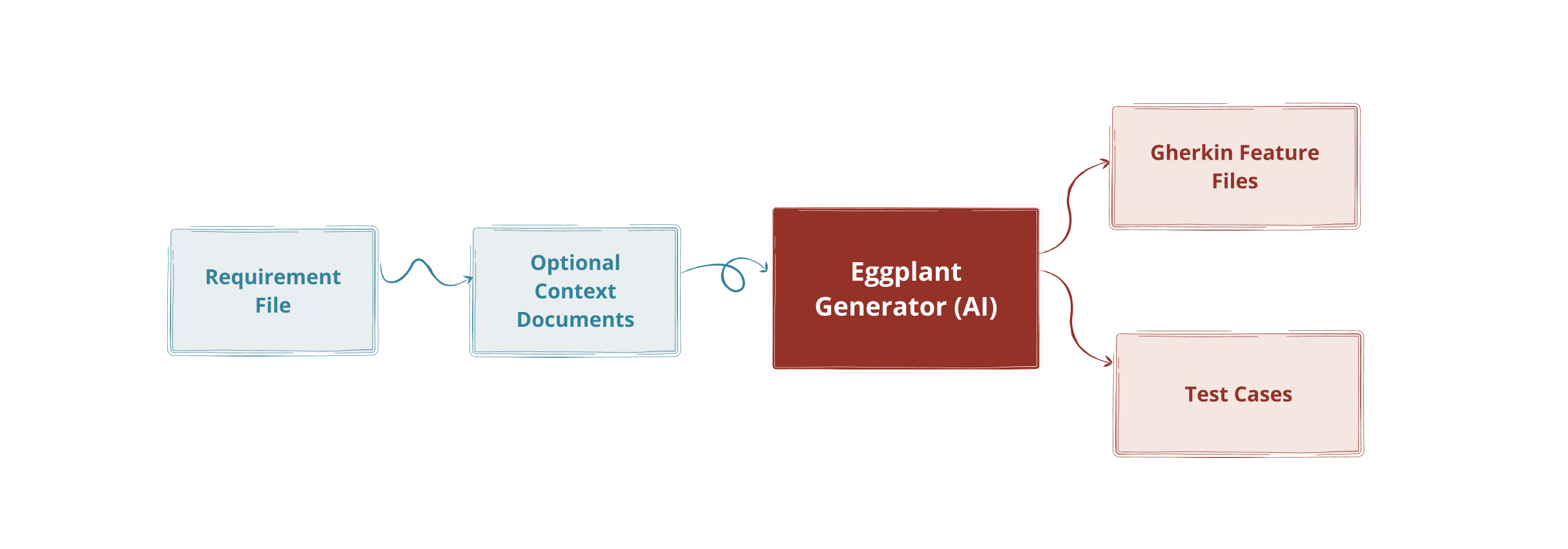
Author-created illustration based on publicly available Keysight information, simplified for explanatory purposes. Source: [I1].
My role
I worked as Head of UX, acting as a hands-on Lead Product UX/UI Designer, responsible for the end-to-end product experience across the initiative. I shaped the experience for an enterprise AI product, balancing organisational, technical, and regulatory constraints.
I partnered with product and engineering leadership to support delivery, clarify experience goals, and ensure the solution met the needs of end users in secure enterprise contexts.
- Role: Head of UX, acting as Lead Product UX/UI Designer.
- Responsibility: End-to-end ownership, from problem framing through interaction and visual design to delivery alignment.
- Product leadership: Supported direction and scope with product management and engineering.
- Cross-functional collaboration: Worked closely with product, engineering, backend and architecture partners, and QA to deliver an initial release and support iteration over time.
Deep dive
Problem definition
Enterprise QA teams often rely on natural-language requirements, but turning them into runnable tests can be slow and manual. Tests are frequently authored by hand, maintained separately from requirements, and updated inconsistently.
This illustration shows reasons manual work is risky and slow. Author-created data visualisation using Claude AI based on publicly available Keysight information, simplified for explanatory purposes. Source: [AI2].
In many settings, requirements may live in spreadsheets or external tools that don't integrate with the test run and execution software. This creates gaps between requirements and tests, and makes it harder to trace failures back to their source.
Limited end-to-end traceability increases operational effort, slows releases, and raises compliance and audit risk where evidence must link back to approved requirements.
Objectives
Eggplant Generator is positioned to use enterprise-grade generative AI to improve how requirements are transformed into test assets, while supporting control, security, and traceability in regulated environments.
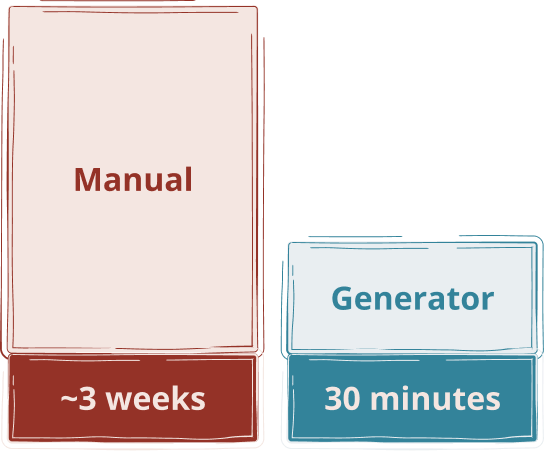
This illustration shows the core pain is manual effort and time vs AI-assisted generation. Author-created illustration based on publicly available Keysight information, simplified for explanatory purposes. Source: [I3].
The core objectives were to:
- Reduce manual effort in turning requirements into runnable tests.
- Maintain a link between requirements, generated tests, and outcomes.
- Easily see which requirements are tested without manual tracking.
- Support reliable use in offline, customer-controlled, and restricted enterprise environments.
These objectives helped align product, design, and engineering around enterprise needs.
Strategy & success approach
For enterprise and offline-capable contexts, the strategy prioritised automation, consistency, and traceability over optimisation.
Key principles included:
- Using AI to generate test assets directly from requirements, reducing manual scripting.
- Treating traceability as a first-class capability.
- Designing workflows that don't assume continuous connectivity or always-on telemetry.
- Keeping authoring lightweight and predictable within existing QA workflows.
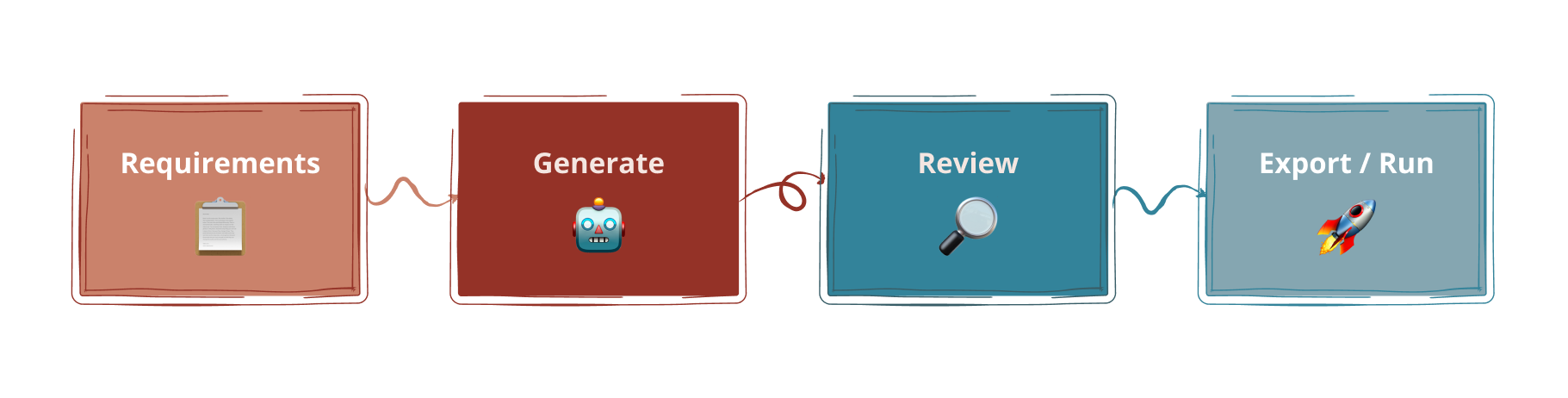
This illustration shows the main flow of of the Generator. Author-created illustration based on publicly available Keysight information, simplified for explanatory purposes. Source: [I4].
Users & context
Primary users (as positioned for the product)
- QA engineers and test developers/test designers: Create and maintain test assets, execute tests, and investigate failures.
- QA leads and managers: Monitor coverage/traceability and communicate confidence to stakeholders.
Secondary users
- Product managers and business analysts: Often author the requirements tests are derived from.
- Security and compliance stakeholders: Focus on controlled deployment, offline operation where needed, and auditable links.
Environment context
- Enterprise environments may be restricted or offline.
- Requirements often sit outside the testing suite, while tests/results are managed within it.
- Teams may use BDD practices, with Gherkin-style scenarios where applicable.
- Regulated industries typically require strong auditability and traceability.
Constraints and risks
The work was shaped by enterprise constraints that influenced experience design and delivery:
- Security and deployment: Positioned for customer-controlled deployment, including offline and air-gapped setups.
- Data access: Designed without assuming continuous connectivity or always-on telemetry.
- Integration boundaries: Designed to fit alongside existing testing systems and established QA processes.
- Compliance: Traceability treated as a core capability for regulated workflows and audit expectations.
- Usability & accessibility: Aimed to remain efficient and accessible without adding unnecessary friction.
These constraints reinforced the need for a simple, resilient experience supported by AI-driven automation rather than manual workarounds.
Research & validation approach
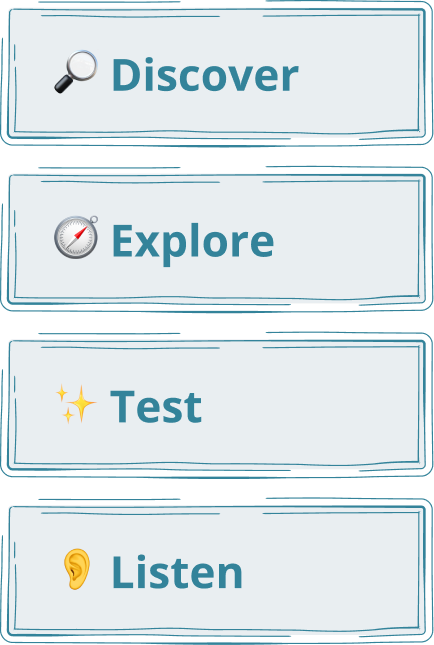
Research and validation helped guide the experience in a complex enterprise environment with strict security constraints. The work focused on QA workflows, how tests are written, and how requirements are tracked, as well as whether the AI-assisted experience was clear, trustworthy, and gave users enough control.
Activities were conducted within confidentiality, privacy, and access constraints typical of regulated and offline environments.
📢 Details are intentionally abstracted, and findings/artefacts are not shared here due to confidentiality obligations.
Collections list showing the newly created assets.
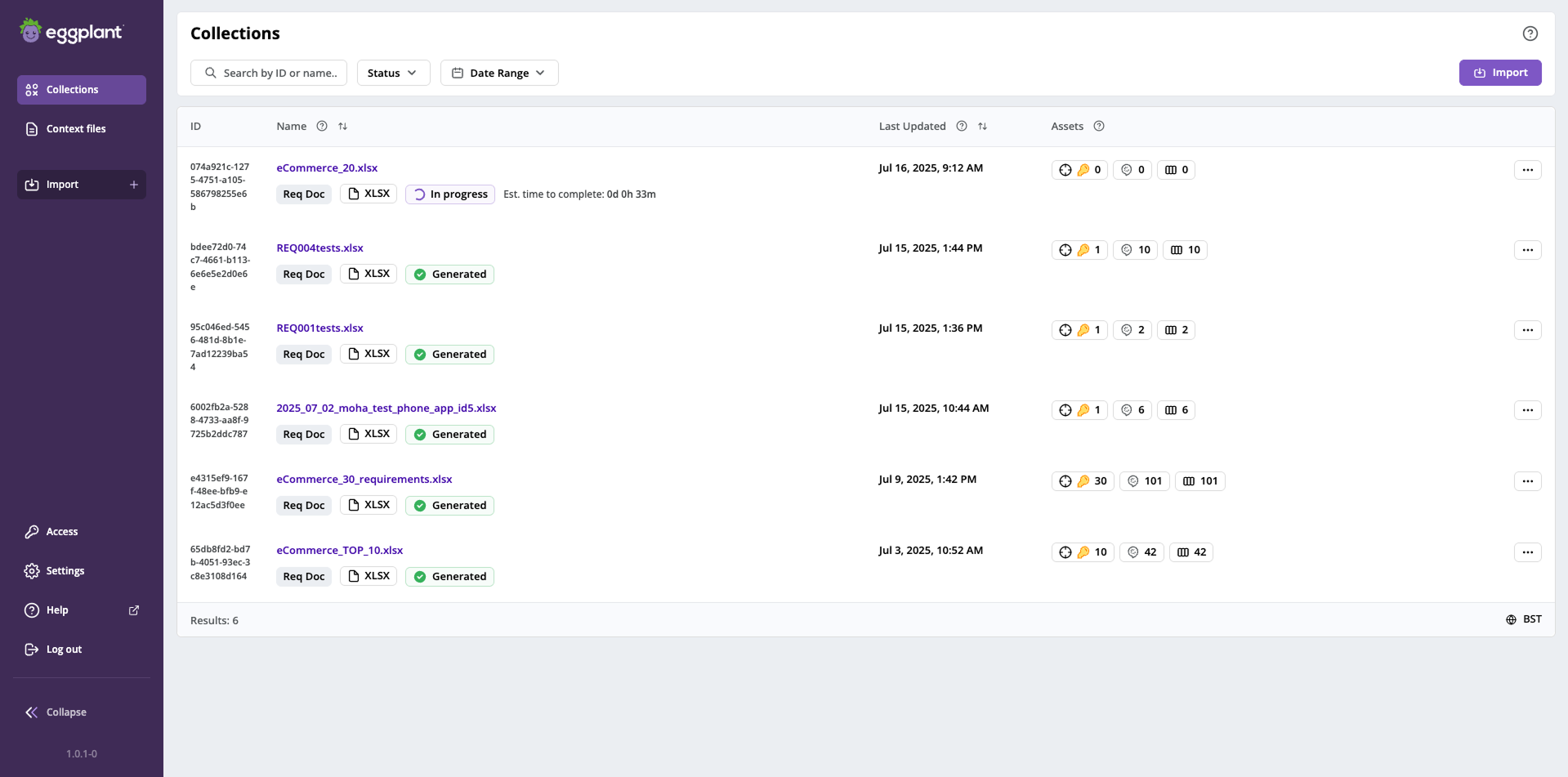
Image from publicly accessible Keysight website. Source: [V3].
Solution overview
The solution was an enterprise AI test asset generator that enables users to import requirements and produce structured test assets that remain linked to their source.
Through a secure, browser-based interface, users can generate AI-assisted test scenarios and manual test cases, review the output, and download generated assets, while preserving traceability across the workflow. The product is positioned for customer-controlled deployment, including offline and restricted enterprise environments.
At a high level, Generator is positioned to convert requirements into test assets (including Gherkin scenarios and manual test cases) in minutes, reducing manual authoring effort.
Process
The process focused on reducing risk, aligning stakeholders, and grounding the experience in enterprise needs, while respecting security, access, and confidentiality constraints.
Problem Definition & Discovery
This phase focused on building a shared understanding of enterprise QA challenges and the context in which they occur.
Discovery centred on understanding workflows, roles, and constraints across relevant stakeholders. Input from user-facing and cross-functional partners helped clarify how requirements are authored, how tests are created, and where friction and risk build up across the lifecycle.
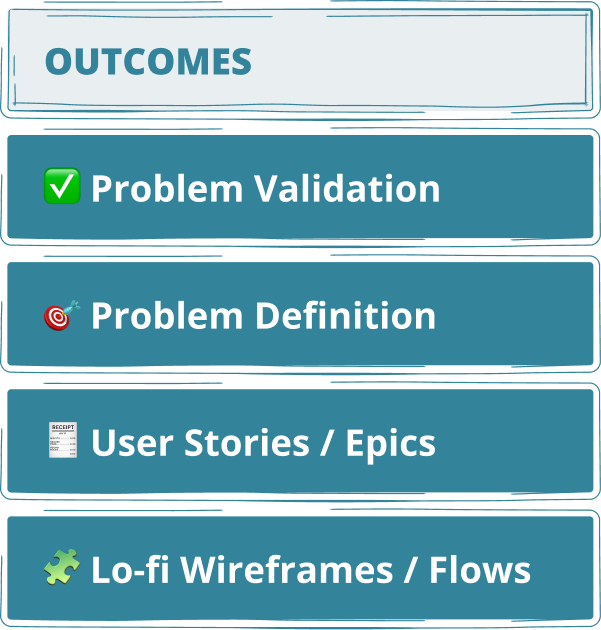
This work helped understand who the main users were and what they needed to do, keeping the focus on real problems in an enterprise setting.
The problem space was also explored by reviewing similar tools and industry practices. While many SaaS solutions exist, most rely on cloud systems that do not meet the security needs of regulated or offline enterprise environments. This reinforced the need for a solution designed for secure enterprise use. UX principles and consistency guidelines were also applied to support a clear experience.
Ideation
Once the problem and key use cases were defined, we explored several solution ideas to address user needs, constraints, and business goals.
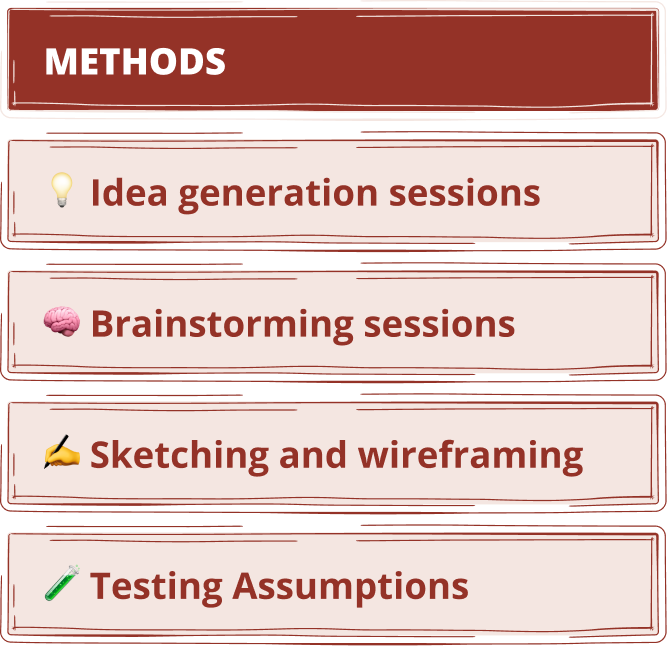
Early concepts were kept simple to allow quick exploration without committing too early. Collaborative reviews helped identify risks, test assumptions, and check feasibility within a complex enterprise workflow.
Feasibility and scope were considered alongside the experience design to support gradual delivery. This iterative work helped narrow the options to a few strong directions and created a clear starting point for prototyping and refinement.
Early prototyping & feasibility evaluation
We developed the strongest concepts into more detailed mockups and shared them with cross-functional stakeholders to gather feedback and alignment, clarifying fit with product goals and enterprise expectations.
In parallel, we worked closely with engineering to test feasibility against technical constraints, surface edge cases, and confirm integration boundaries. This helped clarify what could fit into an initial release versus later iteration.
This stage reduced risk, aligned scope, and built shared confidence across design, product, and engineering, creating enough detail to move into fuller designs and structured handoff.
Interactive prototyping
We created high-fidelity, clickable prototypes representing the intended UI and interaction patterns, showcasing end-to-end flows, interaction states, and system behaviour so the experience could be reviewed as a whole.
Prototypes captured how users upload the requirement documents and review AI-generated output and how the system responds across key states, including empty and error scenarios. Key layouts, behaviours, and interaction rules were captured to reduce ambiguity for implementation.
Short UX review loops kept decisions aligned with business goals, technical constraints, and enterprise requirements. Feedback was incorporated continuously, resulting in a polished, testable prototype and clear guidance before handoff.
User research and evaluation
Testing and evaluation were a critical part of the process, especially given the complexity of introducing AI into enterprise and offline-capable contexts.
Research and evaluation focused on how QA teams author tests, common traceability challenges in multi-tool environments, and whether the AI-assisted experience supports clarity, confidence, and efficient task completion. Methods were selected carefully to respect security, privacy, and access constraints typical of enterprise settings.
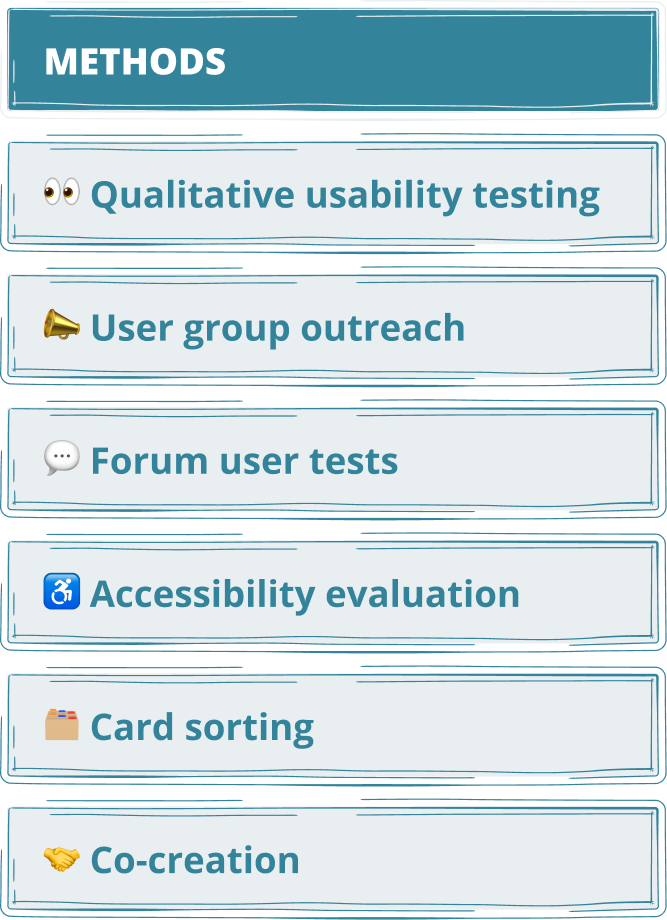
Rather than optimising individual screens in isolation, evaluation centred on core workflows and interaction patterns such as reviewing AI-generated tests, keeping source requirements visible, and maintaining clear references as work progresses. Feedback was used to refine flows, improve guidance, and clarify system states so users could recover easily when something went wrong.
In contexts where live telemetry isn't appropriate, evaluation relied on structured qualitative feedback and cross-functional review to assess whether the experience supported reliable requirement-to-test alignment without adding unnecessary friction.
Insights from evaluation were translated into updated flows, clearer copy, and more robust edge and error states. These were aligned with product and engineering through acceptance criteria and shared understanding, supporting a buildable, enterprise-ready experience.
Key decisions
In secure enterprise contexts, aligning on trade-offs mattered as much as execution. this section summarises key experience decisions and the reasoning behind them, balancing user needs, feasibility, and enterprise risk. rather than focusing on individual ui details, it highlights the approach taken to designing an ai-assisted workflow.
Turning manual requirements into test assets using AI
Context & problem
Requirements often arrive as natural-language documents written by product managers or analysts. Converting these into runnable Gherkin or BDD test assets can be manual and time-consuming, slowing feedback loops and limiting how much coverage teams can maintain.
Options & trade-offs
One option is to keep authoring within existing tools, avoiding a new interface but continuing to rely on manual, inconsistent practices. Another is a focused AI-assisted experience that generates structured draft assets from requirements, reducing manual effort, but requiring careful design to support trust, clarity, and adoption.
Decision & rationale
The direction taken was a dedicated AI generator experience. This supports more structured output at the point of generation and helps maintain requirement references through generated assets to support traceability. The approach prioritised clarity and long-term maintainability while keeping the workflow usable in secure enterprise settings.
Traceability: fixing broken requirement links
Traceability was treated as a core part of the workflow at two points: (1) linking requirements to the tests created from them, and (2) supporting traceability into downstream QA workflows where applicable.
Context & problem
In many organisations, requirements are authored outside the testing system while tests live elsewhere. Teams often rely on spreadsheets or naming conventions to bridge the gap, but these approaches can be fragile as work evolves.
Approach
The approach focused on carrying a consistent requirement reference from generation into downstream test assets. This supports clearer coverage and reduces reliance on manual linking, while fitting within offline and restricted enterprise environments.
Result-to-requirement linkage
Context & problem
When tests fail, teams need to quickly understand which requirement is affected. Without a consistent reference carried through execution, triage can depend on manual investigation and inference.
Approach
The workflow is designed to support preserving requirement references where possible, and to make missing links visible so teams can resolve them without disrupting normal work. This supports reliability and day-to-day usability in secure enterprise contexts.
Why these decisions mattered
Across these choices, the common thread was designing AI-assisted workflows that improve speed and consistency without sacrificing control, trust, or traceability. The goal was to support secure enterprise use while keeping the experience practical under real operational constraints.
Delivery and hand-off
In secure enterprise contexts, aligning on trade-offs mattered as much as execution. this section summarises key experience decisions and the reasoning behind them, balancing user needs, feasibility, and enterprise risk. rather than focusing on individual ui details, it highlights the approach taken to designing an ai-assisted workflow.
We worked with a cross-functional team including product management, engineering, QA, and architecture partners. Collaboration was continuous, with design, product, and engineering aligned from exploration through to delivery.
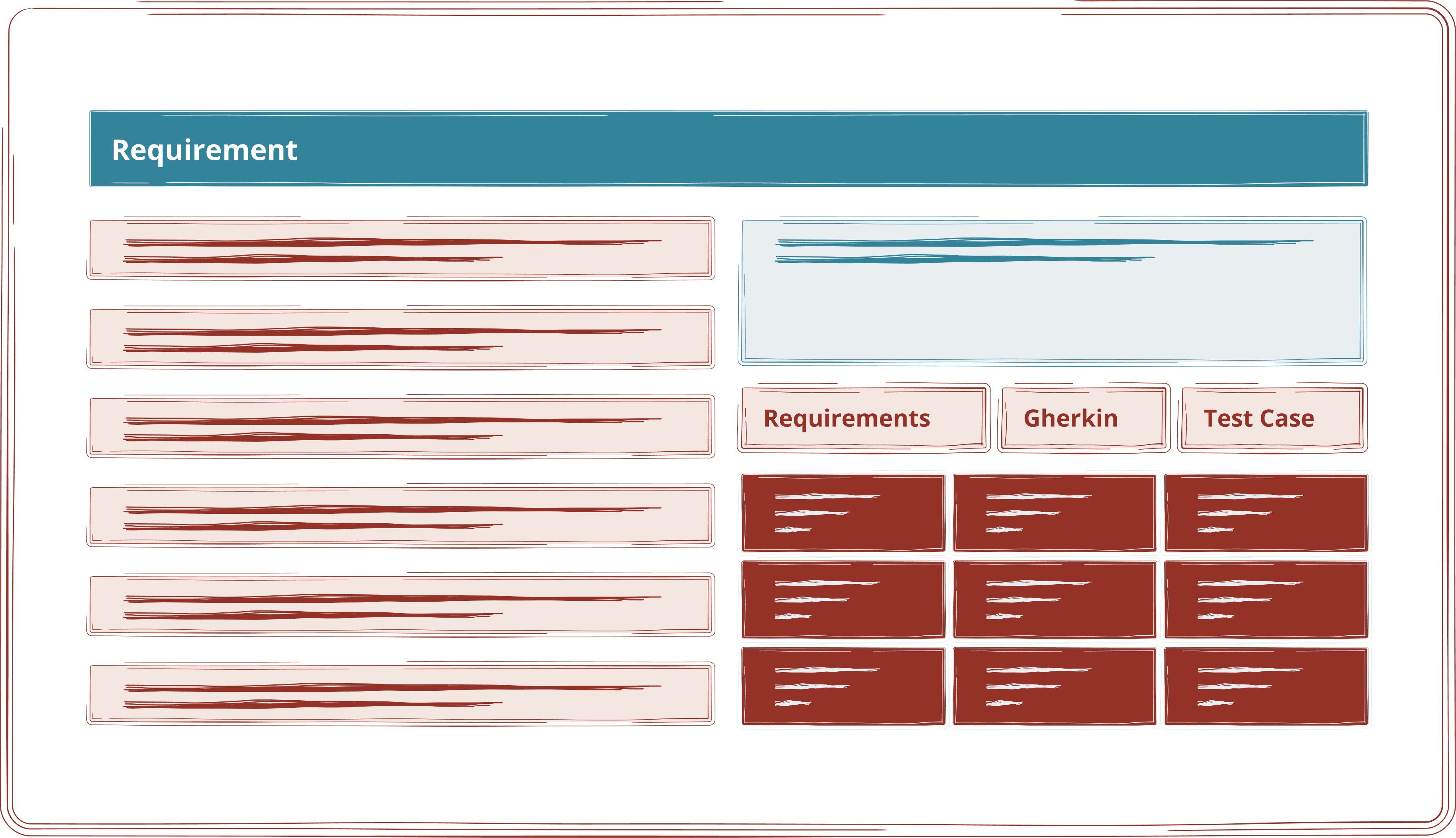
Generator automates creation of test assets directly from natural-language requirements and generates both Gherkin scenarios and conventional test cases. Author-created illustration based on publicly available Keysight information, simplified for explanatory purposes. Source: [I5].
User story definition
From ideation through hand-off, we partnered with product to define epics and shape user stories. Acceptance criteria were developed collaboratively and evolved as designs matured.
Stories were updated until hand-off, allowing changes as we learned more and ensuring the final delivery matched the planned experience.
Story refinement and edge-case alignment
Before development started, we used structured refinement sessions to break larger epics into smaller, ready-to-build stories. These sessions clarified scope, identified edge cases, and answered open questions so development could begin with confidence.
This helped ensure each story had the right context, clear expectations, and design guidance, and that the team understood what needed to be built and why.
The Collections page. Image from publicly accessible Keysight website. Source: [V1].
Engineering collaboration and feasibility
Engineering partners were involved early and consistently to review feasibility and constraints. Proposed flows and interactions were reviewed collaboratively to ensure they aligned with implementation realities.
This was especially important for an AI-driven workflow in secure enterprise environments, helping keep the solution robust without compromising usability.
Design hand-off
During hand-off, design walkthroughs on interactive prototypes were used to align developers and QA on key interactions, behaviours, and expected system responses. The goal was to reduce ambiguity and support implementation quality.
Design guidance focused on interaction logic, system states, and experience principles rather than static visuals alone, supporting a smoother transition from design to build.
"...we succeeded in reducing the man-hours by 92%"
Source: [Q3]
UX reviews and quality assurance
UX quality checks were embedded into delivery. Implemented work was reviewed against design intent to support consistency, clarity, and usability. When constraints appeared, the designs were reviewed again with engineering and QA.
Release and rollout approach
Release was approached incrementally to manage risk. Changes were introduced in stages to validate behaviour before broader rollout, supporting safe adoption without disrupting existing processes or compromising traceability.
Continuous improvement after release
Release marked the start of the next learning cycle. Ongoing cross-functional feedback informed backlog refinement and future iterations, helping the experience evolve while staying aligned with enterprise constraints and quality expectations.
Interaction & visual design
Interaction and visual design focused on clarity, predictability, and trust—especially important when introducing AI into workflows used in secure or restricted enterprise environments, including offline settings.
The goal was to make AI-assisted processes feel understandable and controllable. Interfaces supported review and decision-making rather than automation for its own sake, so users could see what the system produced, relate it back to the original input, and move work forward with confidence.
End-to-end flows were defined with clear interaction rules and system states to support consistent implementation and reliable behaviour across different environments.
Key screens
Only screens that materially influenced behaviour or reduced risk were included. Each screen illustrates a specific design decision rather than visual polish alone.
📢 Screenshots shown are from publicly available Eggplant documentation (see Sources).
Requirement → test generation
Keeping the original requirement visible alongside AI-generated output shifted the user's role from manual authoring to focused review. This supported faster progress while maintaining confidence in the resulting test assets.
Generator converts requirements into Gherkin Scenarious and Test Cases.
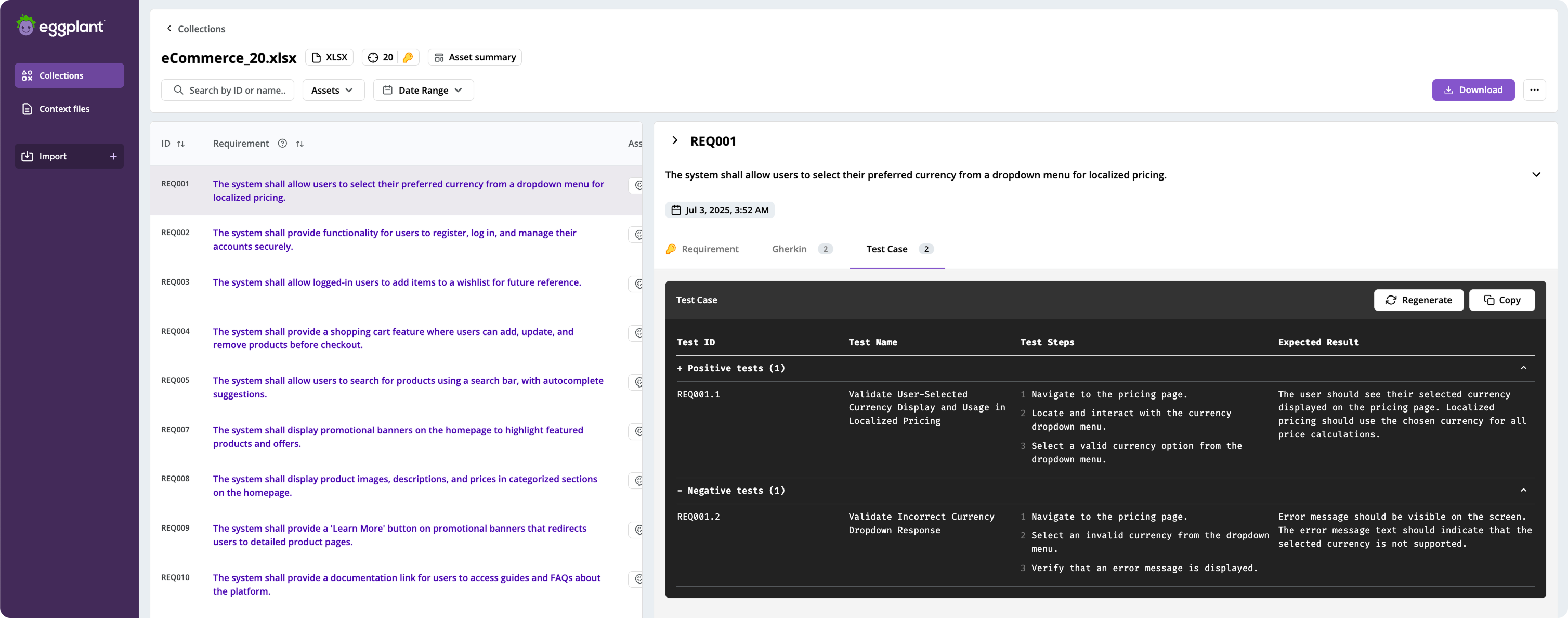
Test case view showing the output in a standard test case format. Image from publicly accessible Keysight website. Source: [V4].
Interaction patterns & micro-decisions
A few small interaction changes made a big difference for usability and trust:
- Source visibility: The original requirement stays visible so users can validate AI output against intent.
- Progressive disclosure: Advanced options and secondary actions appear only when needed.
- Safe recovery: Users can adjust, retry, or correct output without losing work—important in offline or restricted environments.
These patterns reduced cognitive load while supporting careful review and decision-making.
Visual system, components & tokens
The visual system prioritised consistency and readability in dense, workflow-heavy interfaces.
Reusable components and consistent patterns were applied across key workflows to reduce cognitive load and support predictable behaviour. Visual hierarchy distinguished source content, AI-generated output, references, and system states without relying on decoration.
Colour was used to communicate status and risk rather than branding, supporting quick scanning and reducing misinterpretation in critical workflows.
Edge, empty, and error states
Edge cases, empty states, and error handling were treated as first-class design problems.
The experience accounts for scenarios such as:
- No generated output yet
- AI generation interruptions or failures
- Incomplete or missing information
- Outputs that require review before progressing
These states show what happened, what the system is doing, and what the user should do next, without relying on an internet connection or outside help.
Accessibility was applied throughout, following WCAG 2.2. Status, errors, and guidance were communicated with clear text and structure (not colour alone), and interactions were usable across different input methods.
Results
Interaction and visual design focused on clarity, predictability, and trust—especially important when introducing AI into workflows used in secure or restricted enterprise environments, including offline settings.
Faster test creation
Test creation shifted from a manual, write-from-scratch process to a review-and-refine workflow. Teams can start from AI-generated output and focus effort on validation and adjustment. Keysight positions Eggplant Generator as saving hours (if not days) by automating the conversion of requirements into test scenarios and cases, while keeping authors in control of the final result.
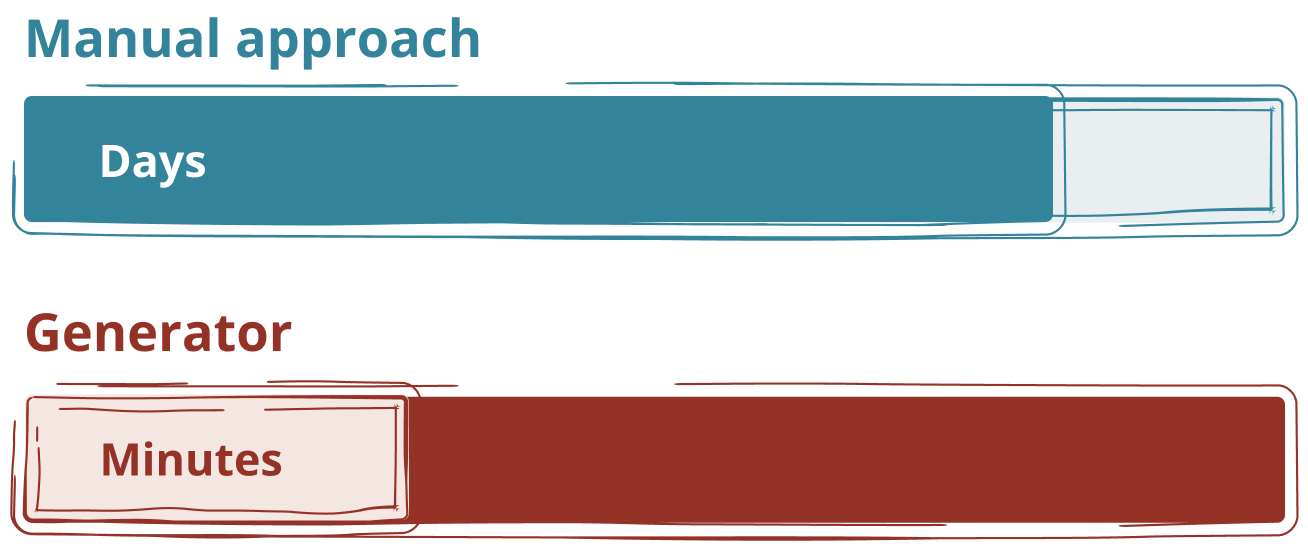
From days to minutes: test asset creation. Author-created illustration based on publicly available Keysight information, simplified for explanatory purposes. Source: [I6].
Stronger end-to-end traceability
Generator's collections are designed to support traceability by linking requirements to the tests created from them. This reduces reliance on naming conventions or external tracking and makes it easier to understand which tests relate to which requirements over time.
Clearer requirement-to-test triage
With a consistent reference linking requirements and generated tests within the Generator workflow, teams can more easily identify which tests relate to which requirements, supporting clearer triage and communication in regulated and audit-sensitive environments.
Outcome
Teams can create tests more efficiently, maintain clearer coverage, and work with greater confidence without adding friction to existing workflows.
Leadership & collaboration
Who was involved
This work was delivered by a cross-functional team bringing together product, design, engineering, QA, and security perspectives. The group included product management, engineering, quality assurance, and security/compliance stakeholders, with me acting as Head of UX while also working hands-on as the lead UX/UI designer.
The team worked remotely and used regular cross-functional check-ins to stay aligned, flag risks early, and make decisions as we built an AI-powered generator for a secure enterprise environment.
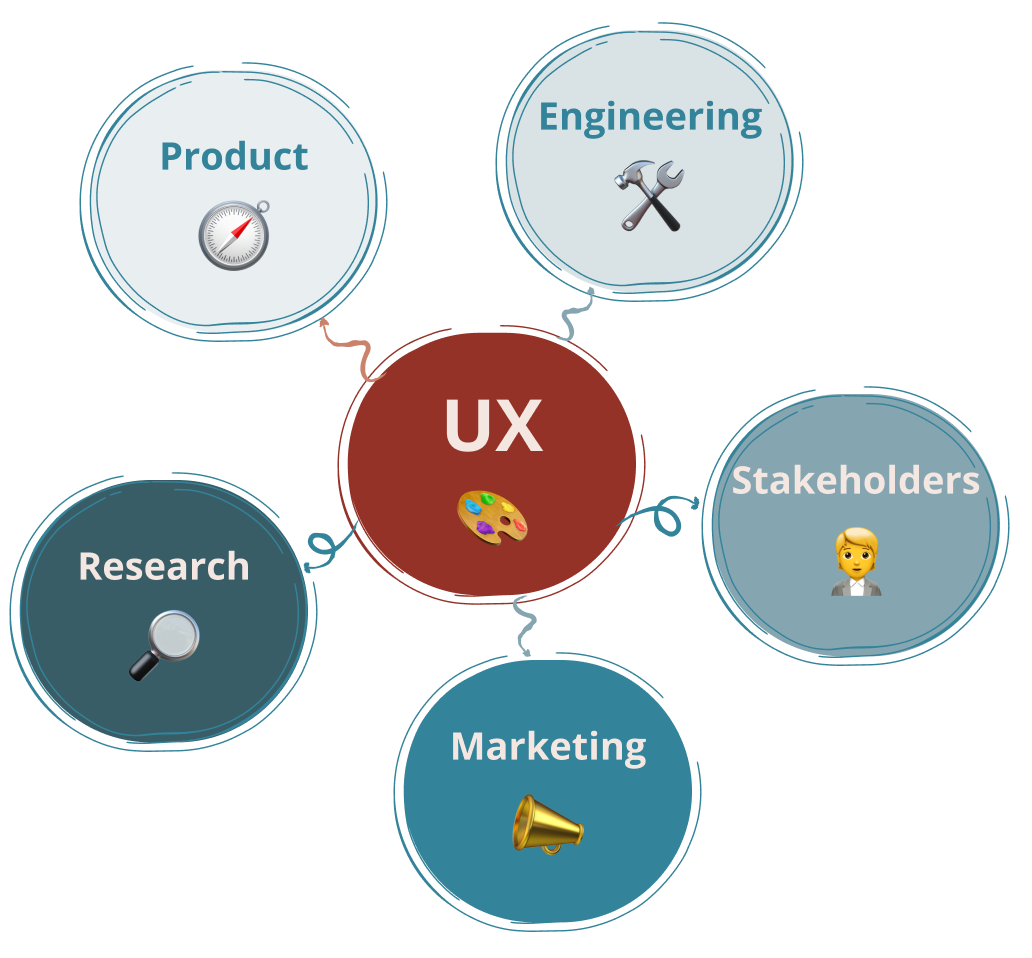
The alignment challenge
A key challenge was agreeing on the right scope for the first requirements upload workflow. Enterprise teams write requirements in many formats and with different levels of structure, and each option affects usability, build effort, and delivery risk.
Supporting many formats from the start adds complexity and slows delivery, while focusing on fewer formats can leave some users out. Each choice also impacts data consistency, AI output quality, and how much validation is needed, so it required joint decisions across UX, product, and engineering.
How we aligned
Alignment came through close collaboration across product, engineering, QA, and security. Trade-offs were made explicit, feasibility and risk were discussed openly, and assumptions were revisited as the work progressed.
Rather than treating scope as fixed, we agreed a shared direction that balanced user needs, delivery risk, and long-term scalability. This kept discussions grounded and avoided local optimisation for any single discipline.
Decision and outcome
We focused the initial experience on a clearly defined, structured input approach that aligned with enterprise expectations and allowed the team to move forward with confidence. By narrowing scope, we reduced risk, maintained momentum, and established a strong foundation for the AI-assisted workflow.
This created a clear base for iteration while ensuring the initial release met quality, security, and usability expectations, and reinforced shared decision-making principles going forward: prioritising clarity, reliability, and long-term value over breadth.
Mentoring and coaching
Growing product UX capability
I mentored a senior UX/UI designer as they grew into a broader product designer role, focused on user-centred practice. Coaching covered planning and running user research, synthesising qualitative insights, and translating findings into clear experience narratives to inform product decisions.
I also helped them explain UX decisions clearly and advocating for quality with product and engineering, keeping UX goals aligned with product strategy.

Supporting growth through mentoring.
Building cross-functional capability
Alongside hands-on design leadership, I strengthened product and UX capability across roles. In addition to mentoring, I supported product partners in effective ways of working, including backlog refinement, writing clear acceptance criteria, and grounding decisions in user needs.
This helped build a shared understanding of UX quality and product intent across disciplines and improved collaboration between design, product, engineering, and QA.
Establishing shared processes and standards
To support consistent delivery, I helped establish a clearer cross-functional delivery process that aligned design, product, engineering, and QA from discovery through delivery. This clarified stages, responsibilities, and handoffs, improving planning and execution.
The result was less ambiguity, stronger cross-functional collaboration, and more predictable delivery while maintaining experience quality.
Establishing shared UX practice
To raise experience quality across related areas, I introduced regular UX critique and feedback sessions. These created space to review interaction decisions, challenge assumptions, and share patterns and learnings.
Over time, this reduced inconsistencies and created a more seamless end-to-end experience across connected user journeys.
Designing for consistency at scale
I supported the move toward a more unified design system, establishing a shared foundation for patterns, components, and visual standards to improve consistency and reduce rework.
By aligning design and engineering around shared principles, teams could focus more on solving user problems instead of revisiting basic design decisions.
Embedding accessibility into UX quality
Accessibility was treated as a core part of UX quality. I introduced accessibility checks as a standard part of the design process, supported by reviews and shared expectations aligned with WCAG 2.2 AA.
This helped ensure accessibility was considered early rather than addressed later.
Role and ownership
I joined this project as Head of UX and was asked to act as the Lead Product UX/UI Designer, combining hands-on design work with UX leadership across the product.
I led the end-to-end UX and UI effort, from problem formulation through interaction and visual design, prototyping, and key design decisions. I worked closely with product and engineering to facilitate framing, ideation, and feasibility discussions, balancing user needs, technical constraints, and business goals within an AI-driven system.
Alongside design ownership, I supported delivery practices such as story mapping, refinement workshops, engineering walkthroughs, and ongoing design reviews. I also supported product leadership by helping shape direction and ways of working, maintaining alignment across product, engineering, QA, security, and leadership stakeholders. Through regular review cycles, I helped the experience evolve while remaining practical, secure, and scalable.
Confidentiality notice
This case study has been intentionally high-level to respect confidentiality obligations. It describes only publicly available product information and observable product behaviour. No internal research outputs, customer-specific information, proprietary artefacts (e.g., design files, prototypes, or internal documentation), or non-public metrics are included. Any screenshots shown are sourced from publicly available Eggplant documentation; links are provided in the Sources section.
Sources
Public sources (Keysight / Eggplant Generator) — Accessed on: 12 Feb 2026
Footnotes
[1] Keysight, Eggplant Generator documentation hub (overview). Public documentation: https://docs.eggplantsoftware.com/gai/
[2] Keysight, Eggplant Generator, Getting Started. Public documentation: https://docs.eggplantsoftware.com/gai/gai-geting-started/
[3] Keysight, Bridging the Gap: Converting Requirements to Test Assets with Eggplant Generator. Public documentation: https://www.keysight.com/blogs/en/tech/software-testing/requirements-to-test-assets-eggplant-generator
[4] Keysight, From Requirements to Test Cases. Public documentation: https://www.keysight.com/blogs/en/tech/software-testing/from-requirements-to-test-cases
[5] Keysight, AI Software Testing and Monitoring Tools (suite overview). Public documentation: https://www.keysight.com/us/en/products/software/software-testing/ai-software-testing-and-monitoring-tools.html
[6] Keysight, Upload requirement documents. Public documentation: https://docs.eggplantsoftware.com/gai/303-gai-upload-document/
[7] Keysight, Map columns in requirement documents (Excel/CSV mapping). Public documentation: https://docs.eggplantsoftware.com/gai/303-gai-map-columns/
[8] Keysight, Generate and download a collection (outputs). Public documentation: https://docs.eggplantsoftware.com/gai/305-generate-collection/
[9] Keysight, Collections and Context Documents (core concepts / traceability framing). Public documentation: https://docs.eggplantsoftware.com/gai/gai-collections-context-docs/
[10] Keysight, Add context files (context documents). Public documentation: https://docs.eggplantsoftware.com/gai/gai-add-context-files/
[11] Keysight, Downloading test assets (Gherkin feature files + CSV test cases). Public documentation: https://docs.eggplantsoftware.com/gai/307-gai-download-assets/
[12] Keysight, View collections and generated assets (review generated output). Public documentation: https://docs.eggplantsoftware.com/gai/gai-view-collections-and-generated-assets/
[13] Keysight, Welcome to Eggplant Generator (GAI 1.1) — on-prem / offline / air-gapped positioning. Public documentation: https://docs.eggplantsoftware.com/gai/GAI%201.1/
[14] Keysight, Deploy Docker Desktop on Windows with WSL 2 (deployment option). Public documentation: https://docs.eggplantsoftware.com/gai/deploy-with-docker-windows/
[15] Keysight, Deploying Eggplant Generator with Kubernetes (deployment option). Public documentation: https://docs.eggplantsoftware.com/gai/deploy-with-k8s/
[16] Keysight, Prerequisites (deployment requirements overview). Public documentation: https://docs.eggplantsoftware.com/gai/prerequisites/
[17] Keysight, Viewing generated collections (view requirements, generated assets, source document; statuses; regenerate/copy actions). Public documentation: https://docs.eggplantsoftware.com/gai/305-gai-view-collections-and-generated-assets/
Quotes
[Q1] Keysight, Automated Test Case Design Generation with Keysight Generator. Public documentation: https://www.keysight.com/dk/en/cmp/2025/automated-test-case-design-generation-with-keysight-generator.html
[Q3] Keysight, Automatic Test Generation and Design with Keysight Generator. Public product/campaign page: https://www.keysight.com/dk/en/cmp/2025/automated-test-case-design-generation-with-keysight-generator.html
Images
[V1] Keysight, Navigation menu showing the Collections section. Public documentation: https://docs.eggplantsoftware.com/gai/gai-using-gai/
[V2] Keysight, Import requirements Step 2: select which columns to import. Public documentation: https://docs.eggplantsoftware.com/gai/303-gai-map-columns/
[V3] Keysight, Viewing Generated Collections. Public documentation: https://docs.eggplantsoftware.com/gai/305-gai-view-collections-and-generated-assets/
[V4] Keysight, Viewing Generated Collections. Public documentation: https://docs.eggplantsoftware.com/gai/305-gai-view-collections-and-generated-assets/
Illustrations
[I1] Keysight, Eggplant Generator docs, Downloading Test Assets. Public documentation: https://docs.eggplantsoftware.com/gai/307-gai-download-assets/
[I3] Keysight, Keysight Generator. Public product page: https://www.keysight.com/dk/en/cmp/2025/automated-test-case-design-generation-with-keysight-generator.html
[I4] Keysight, Blog post, From Requirements to Test Cases: Keysight Generator & Eggplant Test. Public blog: https://www.keysight.com/blogs/en/tech/software-testing/from-requirements-to-test-cases
[I5] Keysight, Automatic Test Generation and Design: Keysight Generator. Public product/campaign page: https://www.keysight.com/us/en/cmp/2025/automated-test-case-design-generation-with-keysight-generator.html
[I6] Keysight, Blog post, Manual Test Case Design and Generation Holding You Back?. Public blog: https://www.keysight.com/us/en/cmp/2025/automated-test-case-design-generation-with-keysight-generator.html
AI Data Visualisations
[AI1] Keysight, Automated Test Case Design Generation with Keysight Generator. Public documentation: https://www.keysight.com/us/en/cmp/2025/automated-test-case-design-generation-with-keysight-generator.html
[AI2] Keysight Blog post, Manual Test Case Design and Generation Holding You Hostage? Keysight Generator to the Rescue! Public blog: https://www.keysight.com/blogs/en/tech/software-testing/manual-test-case-design-generation